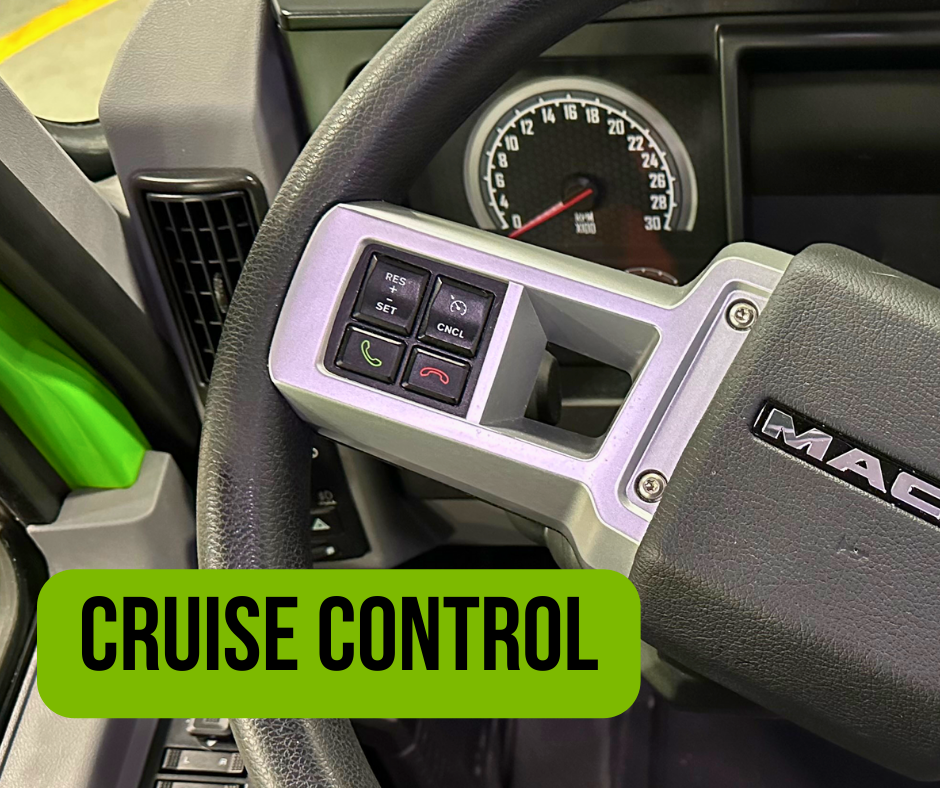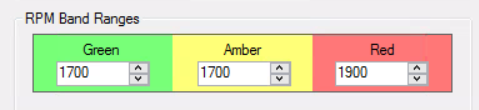
Although engine idling may appear harmless, you may not be aware of the financial costs and truck damage it causes.
Idle wastes fuel and money
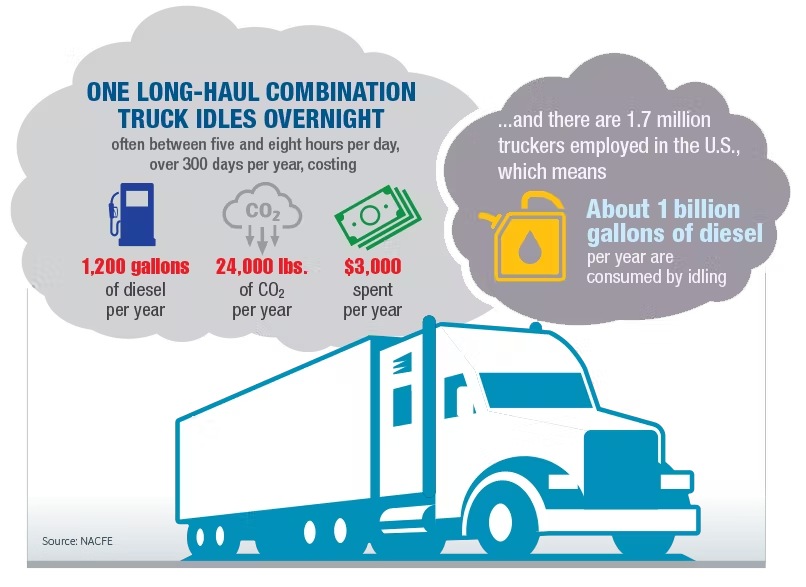
Did you know a truck that idles up to 6 hours daily will consume 1,800 gallons of fuel a year?
For every hour you idle, you burn one gallon of fuel.
If a truck idles for 6 hours per day and operates 300 days a year, it would consume 1,800 gallons of fuel per year, simply idling
At $4.29 per gallon of diesel, this idling comes with a price tag of $7,722 per truck
Idling causes engine wear and tear
Did you know that idling time does more engine damage than starting and stopping? Running an engine at low speed (idling) causes twice the wear on internal parts compared to driving at regular speed. Thus, it increases maintenance costs and shortens the lifespan of the engine.
MK’s #1 repair due to excessive idling:
The most common repair we see related to idling is replacing the DPF filter. Replacing the DPF filter can cost between $2,500 – $10,000 which also leads to 3-4 days of downtime. Not to mention multiple Regens and further damage to DEF pumps and/or 1 box can also occur from high idling.
BT Scorecard:
Idling is also a metric category within the BT Driver Performance Scorecard. As of right now, your score is affected when your engine is idling for more than 3 minutes without moving. To improve your score in the idling category, see the tips down below or contact your DM.
What can you do to help reduce idle time?
Turn off your engine if waiting to load or unload
Turn off equipment during breaks
Follow manufacturer’s recommendations for minimum warm-up time – usually 3 to 5 mins
For last week’s driver spotlights, we recognized the following drivers who went above and beyond! We appreciate you going the extra mile!
First, we would like to shout out Eric Doney for taking the time to completely clean out the truck he was moved into temporarily. It looks like a new truck – thank you for going out of your way to do that for us!
Shout out to Bob Willis for flying out to GA to pick up a truck that had been down for repair. Thank you for the time and effort it took to rescue our truck!
Thank you to Deb Coleman & Dan Schmitt, both worked extra days this past week to help cover Customer freight. We really appreciate having you on our team!
Deb Coleman
Dan Schmitt
Lastly, shoutout to Dave Ward & Mark Jordan and Brandon Jones & Dustin Carey. They all did Meet & Greets to make sure our drivers got home on time. Thank you for keeping our Customers happy!
Did you know you can improve your fuel mpg just by driving at a lower speed? When it comes to optimizing your fuel economy, a lead foot loses. From a cost perspective, we want to show you how much money you can save just by increasing your mpg:
You can conserve fuel by learning how different driving behaviors affect fuel economy and by adopting techniques to save fuel and money. Below are some fuel-saving techniques to start implementing:
Drive at or under the posted speed limit: faster speeds encounter more air resistance, requiring the engine to work harder and compensate with more fuel.
Set a speed that is responsible.
LOVES is MK’s preferred fuel station: We receive the best discounts!
Each MPH over 60 mph equals a 1/10 decrease in MPG
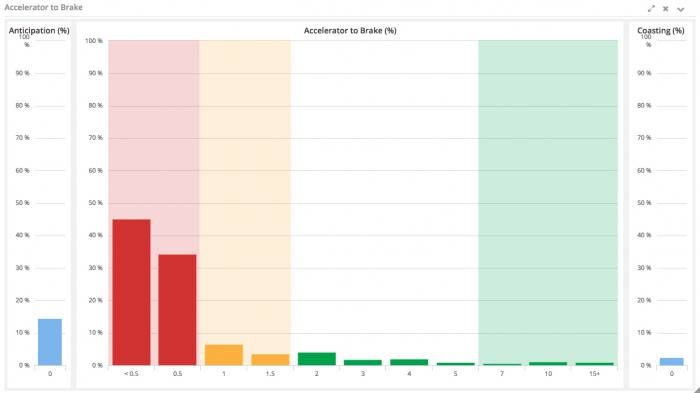
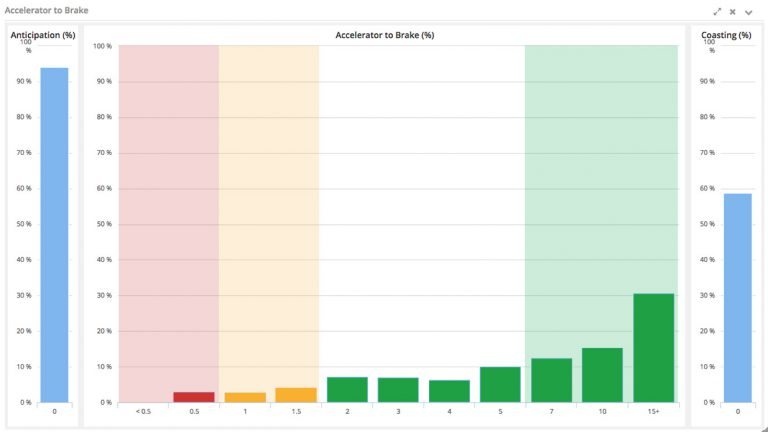
Avoid hard braking and sudden stops by maintaining a proper following distance of 6-7 seconds.
Coast as often as practical: Loaded trucks can coast long distances. For example, when approaching a stop sign, ramp, speed zone, or construction zones, use the momentum of the truck instead of the accelerator.
Accelerate in a relaxed, measured, and deliberate manner.
Shift smoothly and at lower rpms.
Check tire pressure daily using a calibrated tire gauge on trucks and trailers.
Shut the truck off: turning it off even if it’s for a few minutes or a short period of time helps with fuel performance.
Tractors burn up to one gallon of fuel per hour while idling.
Track your weekly fuel economy.
The worst time to start improving your fuel mileage is when fuel costs are high. We should always be proactive and constantly bettering our fuel mileage no matter what.
Spread your knowledge and practice these techniques every day to see improvements!
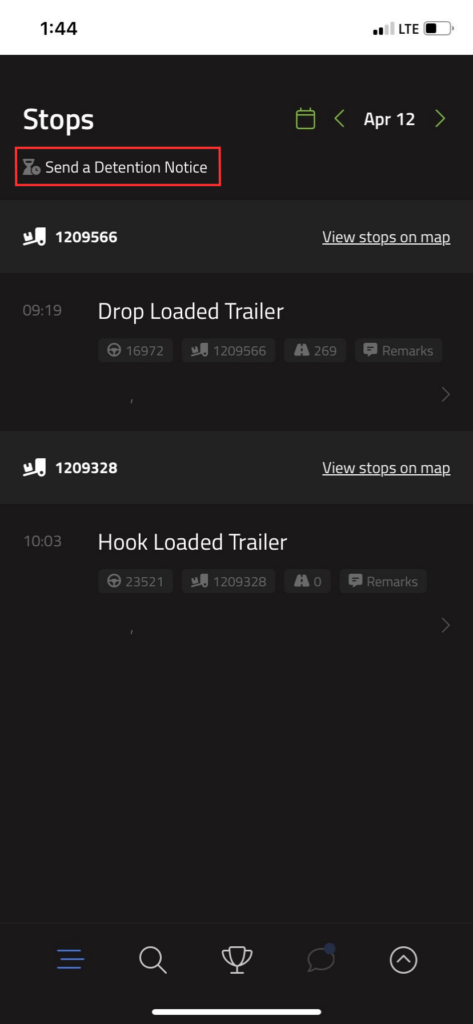
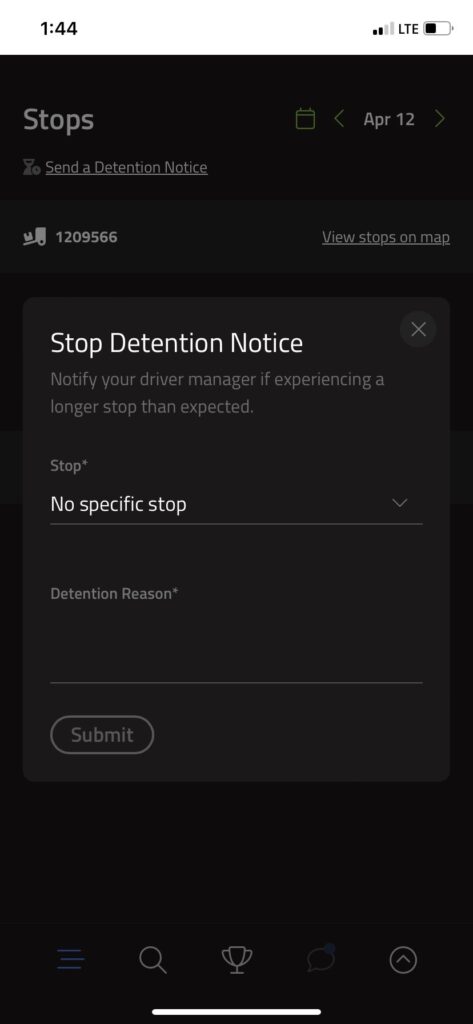
We are constantly trying to improve your wait times at shippers and receivers, but it becomes very difficult to improve on something we don’t know is happening. Being detained can affect the next 2 or 3 loads planned on you, so we need to stay updated. Starting today, please help us help you by following the policies listed below.
Inform your DM if you have been checked in at a shipper/receiver for an hour. This lets us know you are being delayed.
If there is a broker involved, you must also notify them of detention. They must be told beforehand or there will be no compensation.
Once you have done this, keep us posted on your progress. (In a door, unloading, empty, etc.)
All Bill of Ladings must have in/out times on them, whether or not you were detained. This is our only way to get detention, and our only way to verify what we have in the system.
As stated above, we want to help reduce your time in a dock, but we cannot improve this process without your help. The more information we have, the better the process will get!
Please send an email or a BT message to your Driver Managerstating that you have read and understand the detainment policies.
For last week’s driver spotlights, we recognized the following drivers who went above and beyond! We appreciate you going the extra mile!
First, we would like to shout out Orville Merrill. He saw one of our drivers, Cheyenne, on the side of the road with a flat and stopped in his personal vehicle with his hazards on while she waited for repair. He even brought her back dinner from his house. Way to take care of your fellow driver!
Shoutout to Darrell Seaman for he picked up our company car for us in Champaign this week. Thank you for going out of your way to do that for us! We appreciate it!
Thank you to Todd Sargent for helping us cover a rush load to TX for one of our Customers. We really appreciate having you on our team!
Julie K. & Dustin Carey and Molly Gribler & Ryan Ernst all did Meet and Greets to make sure our loads were delivered on time. Thank you for keeping our Customers happy!
In the Drive MK app, we have 23 different badges you can unlock. Some badges are awarded for simple actions, such as adding in your Avatar Profile Picture or adding Company Notes. Others can take a period of time to earn, such as reaching Monthly Top Runner or MK Elite. Nevertheless, put in the work, and you can earn all the badges!
The following article will guide you step by step on how to earn these badges. If you have any questions, reach out to us!
How to locate all your badges:
Go to “Menu” (bottom right icon)
Click the “Profile” tab
The “Badge” section shows the badges you have already earned
Click the “See All” tab within the “Badge” section to view all the available badges
Click on a badge that you’re interested in earning. Then you will be directed to a description of the badge explaining what it is, how to earn it, and how many pro-points it awards.
Milestone Badges
Work Streaker: Work consecutive work days without an excused absence. Awards 1,000 pro-points at 100 consecutive days.
Go to “Menu” (bottom right icon)
Click the “Profile” tab
The “Badge” section shows the badges you have already earned
Click the “See All” tab within the “Badge” section to view all the available badges
Click on the “Work Streaker” badge to see how many days in a row you have worked.
Memoji: Update your Avatar for the first time. Awards 200 points.
Go to “Menu” (bottom right icon)
Click the “Profile” tab
Click the camera icon located on your avatar. (See image below)
Then select the photo you want to appear for your avatar from your photo library
Pin Dropper: Help fellow drivers by adding a new location, such as new companies, truck stops, etc.
Go to “Search” (second icon at the bottom)
Type in either the name or location of the company/ truck stop in the search bar
Scroll to find the correct company name with the corresponding address. Then click on that company name
Click the “Add Company” tab. It will ask you if you are sure about adding it and you will click “yes”
If there isn’t an “Add Company” tab at the bottom of the page, then that company has already been added by either us or another driver
Amenity Updater: Help fellow drivers by updating company’s amenities.
Go to “Search” (second icon at the bottom)
Type in the name of the company in the search bar
Scroll to find the correct company name with the corresponding address. Then click on the company name
Click the “Add Amenities” or “+” tab located under the company’s name
There are many different amenity options to choose from. Click the ones that apply to that company specifically
Click “Save” in the top right corner. If you do not click save, the amenities will not go through
Lowdown: Know a stop really well? Share the lowdown with other drivers by leaving a Note.
Go to “Search” (second icon at the bottom)
Type in the name of the company in the search bar
Scroll to find the correct company name with the corresponding address. Then click on the company name
Click the “Add Note” tab directly across from all notes
Type in what you would like to share. You can even add images by clicking the “Add Media” tab
Click “Save” in the top right corner. If you do not click save, the note will not go through
Curious George: Ask for assistance by submitting a “How do I…” support request.
Go to “Menu” (bottom right icon)
Click the “Support Request” tab
Under “What do you need help with?”, click the drop-down and select “How do I…”
Then share your thoughts. Once finished with your message, click “Submit” in the top right corner
Bug Catcher: Call out bugs by submitting a “Found a bug” support request.
Go to “Menu” (bottom right icon)
Click the “Support Request” tab
Under “What do you need help with?”, click the drop-down and select “Found a bug”
Then share your thoughts. Once finished with your message, click “Submit” in the top right corner
Futurist: Share ideas for new features by submitting a “Feature Request” support request.
Go to “Menu” (bottom right icon)
Click the “Support Request” tab
Under “What do you need help with?”, click the drop-down and select “Feature Request”
Then share your ideas on new features or something you want to add to the app. Once finished with your message, click “Submit” in the top right corner
Other Feedback Submitter: Give general feedback by submitting an “Other” support request.
Go to “Menu” (bottom right icon)
Click the “Support Request” tab
Under “what do you need help with?”, click the drop-down and select “Other”
Then share your thoughts. Once finished with your message, click “Submit” in the top right corner
MKer of the Week: Be on the top of the weekly leaderboard for pro-points. Calculated at the end of each week.
Go to the “Highway of Honor” page (bottom middle icon)
Make sure you have “Pro-Points” and “This Week” selected
Then see who is at the top of the leaderboard
Weekly Top Runner: Finish the week at the top of the Highway of Honor for mileage.
Go to the “Highway of Honor” page (bottom middle icon)
Change from “Pro-Points” by clicking the drop-down and selecting “Mileage.” The leaderboard should change from pro-points to mileage.
Scroll and see who is in the top three for miles and where you are ranked for that week
Monthly Top Runner: Finish the month at the top of the Highway of Honor for mileage.
Go to the “Highway of Honor” page (bottom middle icon)
Change from “Pro-Points” by clicking the drop-down and selecting “Mileage.” The leaderboard should change from pro-points to mileage.
Change from “This Week” by clicking the drop-down and selecting “This Month”
Scroll and see who is in the top three for miles and where you are ranked for that month
Award Badges
Quikr Pickr Uppr: Pick up an extra day of work to earn this badge. Awards 200 pro-points
For the People: Awarded for driver referrals. Awards 500 pro-points
Safety First: Score green in the Safety category on the Blue Tree scorecard. Awards 1,000 pro-points.
Compliance: Score green in the Compliance category on the Blue Tree scorecard. Awards 1,000 pro-points
Performance: Score green in the Performance category on the Blue Tree scorecard. Awards 1,000 pro-points
MK Elite: Score green in all three categories on the Blue Tree scorecard. Awards 1,000 pro-points
The Producer: Do work and exceed quarterly productivity goals. Awards 1,000 pro-points
Million Miler: Drive over 1 million miles with MK. Awards 200 pro-points
Trainer: Member of the MK Training Team
MK Graduate: Successfully completed the MK Finishing Program
Attached you will find a copy of our updated permit book, which includes all of our current permits and insurance information. Make sure you have a hard copy in your truck.
Per diem is NOT an “extra pay”. What we are doing is taking a certain portion of your regular pay and labeling it as a meal and incidental reimbursement instead of taxable income. All this means is the government has decided that as a “perk” of staying out over the road, truck drivers are allowed to not be taxed on a certain portion of their income.
As a company driver, we take care of calculating this for you each week. There is an IRS standard meal and travel allowance deduction at tax time that you will not be eligible for since we take care of it for you all year long. Also, per diem is for “night” spent in the truck and we max out at 5 each week.
Our per diem rate is now increasing from $66 to $69 per day.
If you have any questions, please call your driver manager or accounting! We’re here to help.
“Our shop team is very reliable. When I have any maintenance issues, they give me good direction on how to resolve them, whether it’s something I can fix myself or where I should go to get fixed. Greg, the maintenance manager, goes above and beyond to check in and ensure I’m safe during these issues, even on his time off. The technicians, Grady and Warren, are also so helpful in the shop and always help me get things taken care of.” – Tina Barlow, Company Driver
Together the MK Shop has over 79 combined years of experience within this industry. Such a statement can’t be made by many repair shops. They provide the best service and exceed expectations every day.
“The shop has always responded quickly to my questions and helped with any maintenance needs I have. They have saved me time and money and always provide their best recommendations on where/what I need to get fixed to get me back on the road as soon as possible.” – Harold Cain, Owner Operator
Our maintenance team is truly valuable and they work hard to make sure our equipment is in tip-top shape so that everyone is safe while on the road. We’re proud to have such an amazing maintenance crew.
This a friendly reminder of the regulations to follow regarding Personal Conveyance Status and Split Sleeper Berth Provision!
PERSONAL CONVEYANCE POLICY
You must notify your Driver Manager and note the reason in your ELD remarks when using Personal Conveyance
If completely ran out of time getting loaded/unloaded, PC may be used to travel to the nearest reasonable safe location to obtain the required rest after loading or unloading
Moving a CMV at the request of a safety official during the driver’s off-duty time.
The truck is being used to go from a home terminal i.e. (Sullivan, Effingham, Decatur, Kankakee) to home or vice versa.
Personal conveyance is permitted up to one hour of travel time from the terminal to home.
You cannot use your truck for personal conveyance to go from your home to get a load at a customer.
SLEEPER BERTH PROVISION
The sleeper berth provision allows property-carrying drivers to split their 10-hour off-duty period when the following requirements are met:
One off-duty period (whether in or out of the sleeper berth) is at least 2 hours long, and
The other involves at least 7 consecutive hours in the sleeper berth
Both periods added together must equal at least 10 hours
When paired, neither time period counts against the 14-hour driving window
8-hour sleeper-berth period by itself can no longer be excluded from the 14-hour driving window